Does Huawei Have Google Maps? When Petal Maps Makes Sense

A new Huawei phone does not necessarily mean giving up the places you saved in Google Maps. The more useful question is how you want to navigate now: keep Google Maps where it works well, move more of your daily navigation to Petal Maps, or use both for different situations.
Google Maps access depends on the device
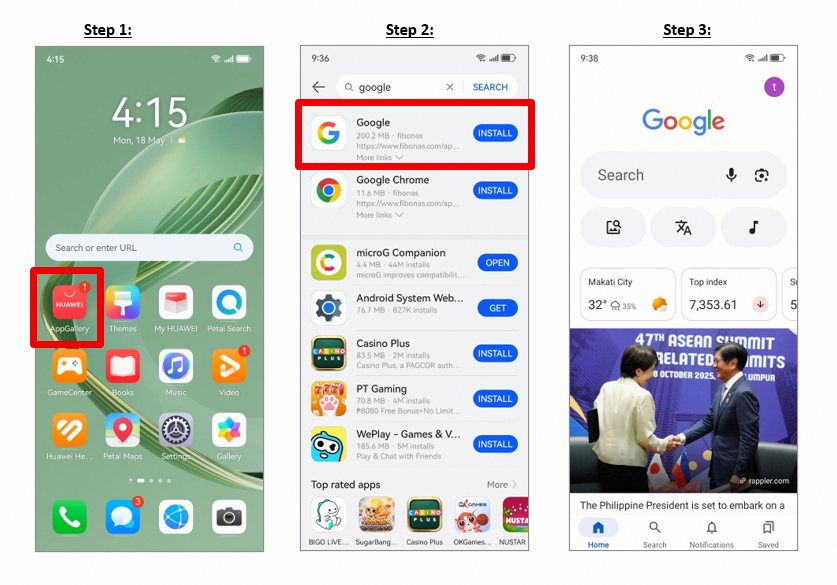
Huawei’s phone lineup includes devices with different software histories, so there is no single Google Maps experience across every model. Phones with Google Mobile Services can offer a more familiar Google setup. On devices without GMS, Huawei support has pointed users to browser versions of Google services such as Google Maps.
This is why does huawei have google maps should not be answered with a blanket statement. A browser may be enough for occasional searches, while regular navigation may be more comfortable in an app designed for the Huawei ecosystem.
Moving saved places is easier than starting over
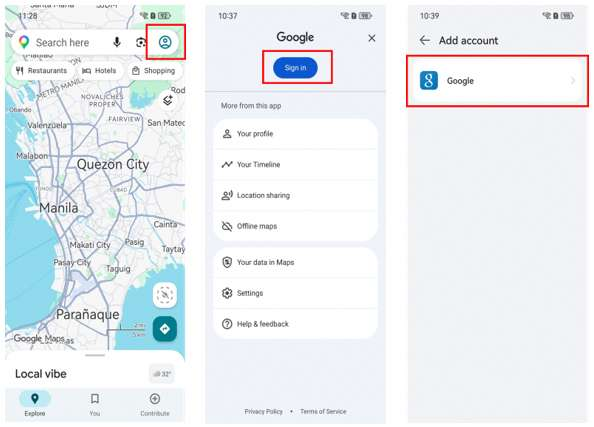
One useful Huawei feature is the ability to move starred places from Google Maps to Petal Maps. Huawei’s support process involves exporting the starred-place data from Google Maps and importing the JSON file into Petal Maps.
It is not a full copy of every piece of Google Maps data, but it can save time if you have a long list of restaurants, offices, hotels or other places you want to keep.
Decide based on the route, not the brand
Try the maps on routes you know well. Compare search results, traffic information, walking directions and voice navigation. A map app that looks fine on the home screen can still be frustrating if it struggles with the local places or transport system you use every day.
The same applies overseas. Check the app in the destination country before relying on it for airport transfers or late-night navigation.
Keep both options available when useful
You do not have to choose one service permanently. Google Maps in the browser can remain useful for shared links and familiar searches, while Petal Maps can handle everyday navigation on a Huawei phone.
The Huawei Community article linked through does huawei have google maps is a useful reference for the original Google Maps setup question. The practical answer is to keep the route that works reliably on your model and use a second map service when it saves time.